Guild icon
oomer's server
Text Channels / bella
Avatar
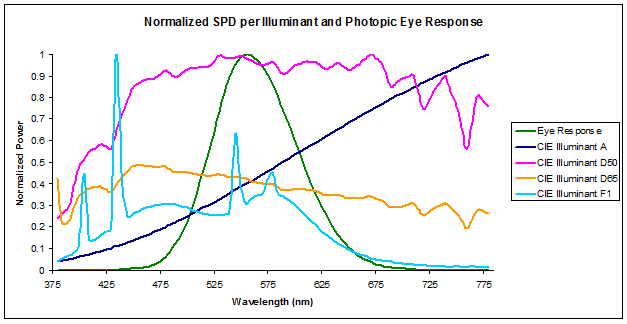
In radiometry, photometry, and color science, a spectral power distribution (SPD) measurement describes the power per unit area per unit wavelength of an illumination (radiant exitance). More generally, the term spectral power distribution can refer to the concentration, as a function of wavelength, of any radiometric or photometric quantity (e....
18:54
There are many ways to define color which result in a three dimensional diagram called a color space.
Avatar
Real-time 3D rendering software to create stunning visuals and animations easy. Intuitive tool for product visualization, car rendering, architecture, jewelry, and more. Try it for free.
Avatar
test (edited)
Avatar
python oomerusd2bella.py -usdfile ./usdz/HU_EVO_RWD_06/HU_EVO_RWD_06.usdc --colordome -subdivision 1 (edited)
00:19
python oomerusd2bella.py -usdfile ./usd/sneaker_pegasustrail/sneaker_pegasustrail.usdc --colordome -subdivision 1
Avatar
Running oomerusd2bella requires a specific Python setup and so I'll write some guide notes here ( and update them ) Microsoft Windows: MacOS:
  • already has Python installed, but this is likely the wrong version (3.11)
  • Pixar's usd-core library is only supported on Python version 3.6-3.10
While you can install Python via pyenv-win or python.org, I personally get a DLL error with usd-core
(edited)
Avatar

oomer's Bella render guides

Here are several W.I.P. guides related to rendering Bella scenes.

Command Line cloud rendering

Vultr (Recommended) Google

General Renderfarm

Linux renderfarm for cloud or local

Windows renderfarm

[Local windows Deadline render farm]( https://github.com/oomer/bellarenderfarm )

Hardware

[TODO] Render box with Dual Xeon 2697v2, X9DRi-LNF4+ and up to 768GB of memory. Can render orange-juice.bsz in 13 minutes.
oomer started a thread. 11/15/2023 18:24
Avatar
New oomerfarm release v0.4 https://github.com/oomer/oomerfarm
  • first beta release
  • updated for Deadline 10.3.0.15
  • local only renderfarm tested, works as expected ( need to enter local ip address behind home router )
  • core scripts renamed for functional clarity
bootstraphub.sh bootstrapworker.sh bridgeoomerfarm.sh becomesecure.sh
  • Added detailed FAQ
(edited)
Avatar
For anybody interested in a dryrun of oomerfarm, using virtualization/emulation of Linux under Windows/MacOS is a great way to get started without investing in new equipment. This is the Linux ISO I use: https://repo.almalinux.org/almalinux/8.8/isos/x86_64/AlmaLinux-8.8-x86_64-minimal.iso Free Windows virtualization: https://www.virtualbox.org Free MacOS virtualization ( Intel ) or emulation ( Apple Silicon ): https://mac.getutm.app You can also try Microsoft WSL with these limits:
  • wsl2 with systemd support
  • Ubuntu-20.04 distribution
  • local to machine only This is also a good way to learn how to run Linux before venturing out into the cloud or installing Linux on local computers. I am doing some performance tests, with bella_cli running under virtualization and just under Windows.
(edited)
Avatar
Operating system virtualization is great, but how much bella render performance do I lose? For years I just had faith in the internet wisdom that virtualization runs at around 95% of bare metal installs. To temper my blind trust in what I read on the internet, I exhaustively tested how orange-juice.bsz renders in various scenarios. https://docs.google.com/spreadsheets/d/1dSzvF2JQSW2fRGYfW6JADr8bLFrSJqB-xNk_cvZZWos/edit?usp=sharing

Interesting bits specific to orange-juice. ##

  • Linux is faster on bare metal than Windows
  • WSL2 virtualization has no performance cost compared to baremetal which is totally unexpected
  • Suprisingly virtualized Linux can match the speed of baremetal Windows
(edited)
Sheet1 bella_cli.exe -i:”orange-juice.bsz” -pf:”settings.threads=0;” Hardware,OS,type,1st run,2nd run,3rd run,Avg Seconds,Performance 2x Intel Xeon 2697v2 24 cores 2.7GHz,Debian 12,Bare metal,12m 17s,12m 9s,12m 14s,733,100% Debian 12,KVM ( debian12 ),12m 56s,12m 47s,12m 37s,764,96% Windows ...
Avatar
Found a worthy new cloud vendor https://phoenixnap.com . They rent bare metal by the hour. The cost per orange-juice.bsz frame crown goes to Google at 3 cents, but while phoenixnap only gets 11 cents/frame ( 4min 15 sec) on a recent Intel Sapphire Rapids Xeon Gold, they provide the following benefits:
  • take paypal
  • from day one it looks like I can rent a 72 core machine ( maybe even several )
  • clean simple interface
  • includes 15 TB outgoing data/month
  • no hypervisor means saving 2-5% performance
  • overkill ram ( 512GB on my last test )
  • overkill network speeds
  • overkill NVME drives
(edited)
Avatar
AMD Epyc Genoa servers are easy to find now. Rendered orange-juice on a Google one for $0.06/hr and one from https://servercloud.com for $0.11/hr with a door fee of $9/month . Both were allocated with 4vCPU's but the servercloud one finished in 39min 34s (9654 2.9GHz ) while the Google Genoa ( 9B14 2.6GHz ) took 57min 2sec. Somebody messed up because last year's Google t2d-standard-4 AMD Milan at $0.03/hr is both faster and cheaper with a rendertime of 48min 10sec
Avatar
AMD Epyc Genoa is widely available
  • Interwove tests on Epyc Milan and Rome to compare

Testing with 23.4.0 ##

./bella_cli -i:"orange-juice.bsz" -pf:"settings.threads=0;" oracle vm.standard.e5.flex 4ocpu ~$0.11/hr spot ( 9J14 2.6GHz ) 27m 41s oracle vm.standard.e4.flex 4ocpu ( previous gen Epyc Milan ) ~$0.08/hr spot ( 7J13 2.45GHz ) 34m 1s servercloud.com ~$0.11/hr reserved ( 9654 2.9GHz ) 37m 19s amazon m7a.xlarge ~$0.08/hr spot ( 9R14 2.6 GHz) 37m 31s amazon c7a.xlarge ~$0.09/hr spot ( 9R14 2.6GHz ) 37m 35s google t2d-standard-4 (SMT off) ( previous gen Epyc Milan ) ~$0.03/hr spot ( 7B13 2.5GHz) 48m 10s tensordock 4vcpu ( previous gen Epyc Rome ) ~$0.13/hr reserved 50m 26s google c3d-standard-4 (BAD) ~$0.06/hr spot ( 9B14 2.6GHz ) 57m 2s oracle vm.standard.e4.flex 2ocpu ( previous gen Epyc Milan ) ~$0.045/hr spot ( 7J13 2.45GHz ) 66m 28s
(edited)
Avatar
Found another Etsy of computing https://vast.ai, like tensordock but instead of a few dozen sellers, vast seems to have hundreds of interesting configurations. Unlike tensordock which uses KVM, vast.ai uses docker which is closer to bare metal. Each instance had a GPU which I did not use. 5950x [RTX 2080 TI] 32vCPU 8m 13s 7950x [RTX 4090] 32vCPU 5m 37s 3970X [RTX 3080] 64vCPU 5min 23s Epyc 7742 [A40] 256 vCPU 3m 31s 5995WX [Titan RTX] 128 vCPU 3min 16s The docker 5950x matches Jeremy's windows speed ( I was hoping for an Ubuntu 3% gain ) and even with an unused RTX 2080 the price was $0.0175 per orange-juice.bsz (edited)
19:12
a helper script to run bella_cli in the cloud or on a home Linux server - GitHub - oomer/cloud_bella_cli: a helper script to run bella_cli in the cloud or on a home Linux server
Avatar
Tested a European hourly datacenter http://iwstack.com. AMD Epyc 7402P 12 vcpu for €0.072/hour . Only catch is they only allow 75% cpu usage to not lock each shared physical core and negatively affect other users. Even clamped to 75%, orange-juice.bsz renders in 26min 58s making it about €0.035 per orange juice ( new unit the poj ) . Servers in Italy, Netherlands and Romania. Running -pf:"settings.threads=8;" will lock 8 vcpus of the 12 at 100%. A cpulimit -e bella_cli -l 80 will become an option in cloud_bella_cli and oomerfarm. (edited)
Avatar
Thoughts on embedding
  • ssh client in bella_gui
  • ssh server in bella_cli
    • bella_gui would get:
- UI to store a list of ip's to Linux servers - UI to generate private keys - buttons for Connect/Sync/ CloudIPR / Cloud Render
When Connectcbutton is pressed
  • bella_gui connects to each server over ssh
  • adds server to live pool after adding drivers and downloading bella_cli and starting bella_cli in daemon mode which open a ssh port 22222
  • reconnect from bella_gui to bella_cli ssh server
  • live ssh tcp connection allows
When CloudIPR button is pressed
  • bella_gui ssh's to fresh Linux servers over vanilla ssh server and installs bella_cli and vulkan/gl drivers ( one time )
  • bella_cli with embedded ssh server gets launched and opens port XXXXX accepting live tcp commands
  • current scene is saved to .bsz and sftp'ed to port XXXXX on all servers
  • hash for each scene is checked for sync
  • live command sent over ssh to start IPR mode
  • A dozen plus live bella_cli IPRs could dump to bella_gui to update the render window
When Cloud Render button is presses
  • same as above but Render mode nor IPR
  • bella_gui merges the .bsi's from co-operative renders Might be a support nightmare and a far future idea
Just my current thinking 🤔
(edited)
18:42
Avatar
Xeon 2697x2 24 physical cores [INFO][16:53:31] Saturn | Elapsed: 2s | Bench: 3199 [INFO][16:53:32] Saturn | Elapsed: 2s | Bench: 3210 [INFO][16:53:32] Saturn | Elapsed: 3s | Bench: 3163 [INFO][16:53:33] Saturn | Elapsed: 3s | Bench: 3152 [INFO][16:53:34] Saturn | Elapsed: 4s | Bench: 3124 [INFO][16:53:34] Saturn | Elapsed: 5s | Bench: 3098 [INFO][16:53:35] Saturn | Elapsed: 5s | Bench: 3105 [INFO][16:53:36] Saturn | Elapsed: 6s | Bench: 3109 [INFO][16:53:40] Saturn | Elapsed: 10s | Bench: 3492 [INFO][16:53:44] Saturn | Elapsed: 14s | Bench: 3644 [INFO][16:53:48] Saturn | Elapsed: 18s | Bench: 3726 [INFO][16:53:52] Saturn | Elapsed: 22s | Bench: 3770 [INFO][16:53:56] Saturn | Elapsed: 26s | Bench: 3792 [INFO][16:54:00] Saturn | Elapsed: 30s | Bench: 3821 [INFO][16:54:04] Saturn | Elapsed: 34s | Bench: 3832 [INFO][16:54:08] Saturn | Elapsed: 38s | Bench: 3851 [INFO][16:54:12] Saturn | Elapsed: 42s | Bench: 3868 [INFO][16:54:16] Saturn | Elapsed: 46s | Bench: 3879 [INFO][16:54:20] Saturn | Elapsed: 50s [INFO][16:54:28] Saturn | Elapsed: 59s | Progress: 6.87% [INFO][16:54:36] Saturn | Elapsed: 1m 7s | Progress: 13.46% [INFO][16:54:44] Saturn | Elapsed: 1m 15s | Progress: 19.49% [INFO][16:54:52] Saturn | Elapsed: 1m 23s | Progress: 24.61% [INFO][16:55:01] Saturn | Elapsed: 1m 31s | Progress: 28.97% [INFO][16:55:09] Saturn | Elapsed: 1m 39s | Progress: 32.49% [INFO][16:55:17] Saturn | Elapsed: 1m 47s | Progress: 35.62% [INFO][16:55:24] Saturn | Elapsed: 1m 55s | Progress: 38.29% [INFO][16:55:31] Saturn | Elapsed: 2m 2s | Progress: 40.68% [INFO][16:55:39] Saturn | Elapsed: 2m 10s | Progress: 42.67% [INFO][16:55:46] Saturn | Elapsed: 2m 17s | Progress: 43.82% [INFO][16:55:55] Saturn | Elapsed: 2m 25s | Progress: 44.62% [INFO][16:56:04] Saturn | Elapsed: 2m 35s | Progress: 45.22% [INFO][16:56:12] Saturn | Elapsed: 2m 42s | Progress: 45.65% [INFO][16:56:19] Saturn | Elapsed: 2m 50s | Progress: 46.00% [INFO][16:56:26] Saturn | Elapsed: 2m 57s | Progress: 46.29% [INFO][16:56:33] Saturn | Elapsed: 3m 4s | Progress: 46.53% [INFO][16:56:41] Saturn | Elapsed: 3m 11s | Progress: 46.69% [INFO][16:56:47] Saturn | Elapsed: 3m 18s | Progress: 46.79% [INFO][16:56:54] Saturn | Elapsed: 3m 24s | Progress: 46.88% [INFO][16:57:00] Saturn | Elapsed: 3m 31s | Progress: 46.94% [INFO][16:57:07] Saturn | Elapsed: 3m 37s | Progress: 46.96% [INFO][16:57:13] Saturn | Elapsed: 3m 43s | Progress: 46.97%
Avatar
Well I paid the price, literally I paid between $0.70-$0.80/hr for 3 x 5995wx Threadripper Pros 64 cores 128 threads. I ran the laser scene for 24 hours on the $0.70/hr one and tried changing beautyPass.bounce settings and ran on 2 more machines for $0.80/hr. The 24 hour run did not come close to resolving the noise was a great test of cloud_bella_cli.sh and vast.ai the cloud vendor.
  • I have done 72 hour cloud renders but this is my first time spending 24 hours on one image 🤓
  • I ran cloud_belle_cli.sh once and could easily switch between the 3 servers using the menu options to check on progress and download .pngs and logs. It is close to V1.0 and provided a very nice workflow.
  • The 24 hour render resolved more noise than Thomas's 115 hour render, meaning at minimum a 4.8X speedup on the 5995wx
  • the bounce reductions unfortunately did not help reduce times and I shut them down after a few hours, but were a good example of wedge testing, meaning trying a different technical or creative approach on a scene and using multiple cloud machines to get faster feedback
  • https://vast.ai is mainly a GPU cloud vendor and I chose them because they have stuff like Threadripper Pros. This is the first time I have run 3 machines and my first 24 hour test. No shutdowns or problems at all.
  • I chose to use on-demand pricing meaning, I can stay on until their maintenence window or I shut down the machine.
  • If I chose auction pricing, I can bid lower and at first I thought I could get it for 90% off, which is what I see with Google and AWS spot instance. At vast.ai the best price for a 5995wx was $0.45/hr. If somebody chooses that server for on-demand at $0.80/hr, I get booted, also somebody can outbid me at $0.46/hr with the same result.
  • When .bsi resume is implemented, auction pricing will be great, since the docker container is just put into a stopped state, and you can restart it by bidding more or waiting until it is less busy. I think you can even move the container to another vast.hi host.
  • Also when Saturn co-op is implemented, cloud_bella_cli can easily orchestrate your render onto as many cloud servers are you can afford and then download all the .bsi's and do a merge.
(edited)
14:22
14:24
myfile.anim juice_scatter.anisotropy=-1f; juice_scatter.anisotropy=1f; 10
14:30
Added animation support to cloud_bella_cli.sh 1. Create a text file with .anim ext ie myfile.anim ( exact node names required )
  • first line is start value
  • second line is end value
  • third line is number of frames to render
juice_scatter.albedo=0.04f; juice_scatter.albedo=0.46f; 27 2. From 5) advanced attach myfile.anim 3. 1) upload .bsz, 2) render 4. Will generate linear interpolation between the 2 values
(edited)
Avatar
Added animation support to cloud_bella_cli.sh 1. Create a text file with .anim ext ie myfile.anim ( exact node names required )
  • first line is node.attribute start value
  • second line isnode.attribute end value
  • third line is number of frames to render
juice_scatter.albedo=0.04f; juice_scatter.albedo=0.46f; 27 2. From 5) advanced attach myfile.anim 3. 1) upload .bsz, 2) render 4. linearly interpolates, images are 4 digit padded 5. orange-juice0001.png-orange-juice0017.png 6. 4) download to get png's from server
(edited)
Avatar
With Jeremy's help here is the alpha relase of bellasliderpreviews.sh (BeSP for short) . A workflow to render animated jpeg Bella attributes and compose html pages. Currently showing a few examples but the goal is to render every attribute available to create a quick-view visual library. https://github.com/oomer/bellasliderpreviews The html file generated work locally or if you are generous you can share your htmls with the community. Works on Linux, MacOS and Windows( git-bash ) Here is a sample http://besp.oomer.org/23.6.0/material/directory.html (edited)
Avatar
bellaSliderPreview update.
  • added optional orbit cam
http://besp.oomer.org/2024/shaderball.bsz.carPaint.flakes.density/index.html
  • added parseFragment to users can recreate scene
  • .besp file sorta turning into a animation scripting language
# Scene files bellaScene=shaderball.bsz # Animation controls bellaSliderType=real bellaSliderStart=0.0 bellaSliderEnd=1.0 bellaSliderFrames=30 # Animation node details bellaSliderNode=bespNode0 bellaNodeType=material bellaNode=carPaint bellaNodeAttribute=flakes.density bellaUnits= # Optional camera orbit bellaOrbitDegrees=360 # Nodes to add, node uuid = bespNode+int bespNode0=carPaint # User selected nodes, done using bella-cli -ln -qa selectMesh=__bodyObj__ selectXform=__preview__ selectCameraXform=__camera__ camMat4=-0.90757089814 0.419898874551 0 0 -0.186001165371 -0.402023570296 -0.896538128251 0 0.376455351045 0.813671914273 -0.442966572771 0 -0.162290415268 -0.345854073816 0.178495858971 1 # Parse fragment queue bellaFragment=bespNode0.flakes.size=10.0f; bellaFragment=bespNode0.flakes.strength=1.0f; bellaFragment=$selectXform.material=bespNode0;
(edited)
Avatar
C# using System; using System.Collections.Generic; using System.Linq; using System.Text; using System.Threading.Tasks; using bella; namespace ConsoleApp1 { class Program { static void Main(string[] args) { var test = new bella.LicenseInfo(); System.Console.WriteLine("HelloWorld");
 System.Console.WriteLine(test.toString()); } } } (edited)
14:25
C# using System; using System.Collections.Generic; using System.Linq; using System.Text; using System.Threading.Tasks; using System.Console; using bella; namespace ConsoleApp1 { class Program { static void Main(string[] args) { var test = new bella.LicenseInfo(); Console.WriteLine("HelloWorld”); Console.WriteLine(test.toString()); } } } (edited)
Avatar
c# StbImageSharp.ImageResult result = ImageResult.FromMemory(File.ReadAllBytes("shaderball2.png"), ColorComponents.RedGreenBlueAlpha); fixed (byte* ptr = result.Data) _gl.TexImage2D(TextureTarget.Texture2D, 0, InternalFormat.Rgba, (uint)result.Width, (uint)result.Height, 0, PixelFormat.Rgba, PixelType.UnsignedByte, ptr); _gl.BindTexture(TextureTarget.Texture2D, 0); (edited)
Avatar
First milestone in my Bella API c# project to port Jeremy's Windows example code to MacOS. Got the essentials of embedding Bella dll, capturing IPR rendering in a custom gui window and the beginning of a camera orbit. Directly used most of the techniques from his code but being a c# novice it took me eons to follow the breadcrumbs of interfaces, pointers, threads, mutex, oh my 🙂. Next step is to use ImGui and play with sliders... (edited)
Avatar
Notes: ( mostly to remind myself in a few months )
  • System.Drawing Bitmap class is not cross platform, used SkiaSharp
  • From bella.onImage() Event use a c# interface to loosely couple ShowImage() method in my gui code to get handle to ipr bella.Image
  • Used this method to make copy of bella.Image, not optimized as this was my first time ever using pointers. Requires unsafe
c# SKBitmap _skb = new SKBitmap(200,200); IntPtr pixelsAddr = _skb.GetPixels(); lock(synclock) { byte* destptr = (byte*)pixelsAddr.ToPointer(); byte* srcptr = (byte*)img.rgba().ToPointer(); for (int row = 0; row < 200; row++) for (int col = 0; col < 200; col++) { //++ after pointer advances to next byte *destptr++ = *srcptr++; //red *destptr++ = *srcptr++; //green *destptr++ = *srcptr++; //blue *destptr++ = *srcptr++; //alpha } }
  • Used Silk.NET graphics framework, intially tried to used ImGUI extension but switched to Silk.NET.OpenGL and a simple textured quad.
  • A lot of OpenGL setup code including vertex and fragment shaders.
  • Intially used OpenGL context handle from ShowImage but it kept crashing ( not sure why ) and fixed this by just setting a bool and in OnUpdate event of Silk.NET window I update the GL textures as needed.
  • TexImage2D takes a pointer to raw pixel data that in SKBitmap. Don't understand why we need IntPtr and then have to convert that into a real pointer??
c# IntPtr pixelsAddr = _skb.GetPixels(); byte* ptr = (byte*)pixelsAddr.ToPointer(); _openglContext.TexImage2D(TextureTarget.Texture2D, 0, InternalFormat.Rgba, 200, 200, 0, PixelFormat.Rgba, PixelType.UnsignedByte, ptr);
  • Used KeyDown=A to run libbella.orbitCamera()
(edited)
Avatar
Found c# assembly called NetMQ ( pure c# implementation of ZeroMQ ). Able to send both string and binary data so this can be used to simplify sending control commands and data to a Bella render node. Here is the client side c# using NetMQ; using NetMQ.Sockets; using (var client = new RequestSocket()) { client.Connect("tcp://10.5.1.10:8799"); byte[] usefulData = [0,3,4,5]; Console.WriteLine("Sending message"); var mes = new NetMQMessage(); mes.Append("parseFragment"); mes.Append(usefulData); client.SendMultipartMessage(mes); var mes2 = client.ReceiveFrameString(); Console.WriteLine("Received {0}", mes2); } This along with the Ssh.NET assembly are the foundation of my current plan for oomerbellafarm. Random thoughts:
  • netmq tcp ports are just open ports (need vpn or ssh tunnel on insecure networks )
  • skip net security with -local
  • is netmq good for transferring .bsz files as byte arrays?
  • client gui needs interface to add/remove workers ip's
  • netmq has async sending, not sure if needed...
  • how to requeue jobs from deadbeat workers? Use cases:
  • client gui to load a scene and distribute to running c# console program "oomerbellaworker" on Windows/Mac ( Linux in future )
  • co-operative mode to work on same frame
  • single scene anim mode with attribute keyframing in client gui, sending delta fragments to workers
  • multi frame mode requiring shared network folder for assets ( vpn? )
Avatar
__preview__
Avatar
Windows MacOS You need to know how Apple Gatekeeper because non-notarized executables are blocked by default. Ubuntu Linux
Exported 43 message(s)
Timezone: UTC+0